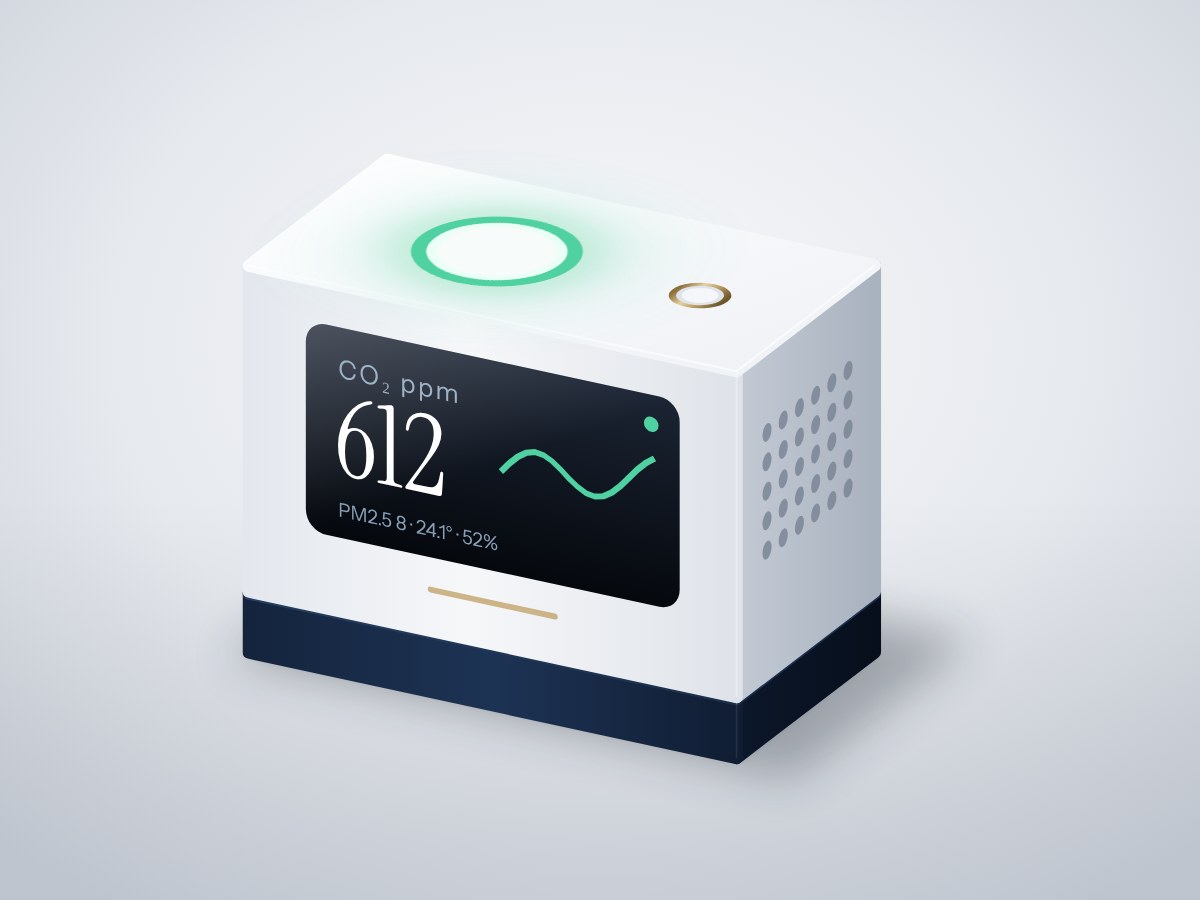
A desk monitor that measures real CO₂ and PM2.5 dust, shows both on a crisp screen and glows green, amber or red so you know when to open a window. It also serves a live chart over Wi-Fi.
- Board
- ESP32 DevKit V1
- Difficulty
- Intermediate
- Build time
- ~3 hours
- Parts cost
- ~₹5,113
Desk air quality monitor
Electrical7₹4,655
Microcontroller1₹704
Power1₹106
Sensor3₹3,186
Display1₹440
Actuator1₹220
Mechanical7₹458
3D printed2₹334
Hardware5₹123
How it works
Stuffy rooms make people tired and city dust is invisible. This monitor uses a true photoacoustic CO₂ sensor (not an estimate from VOCs) and a laser particle counter, the same sensor types used in commercial monitors.
An ESP32 reads both every few seconds, shows the values on a 1.3" OLED and sets an 8-LED ring to green, amber or red. A button cycles the screen between CO₂, PM2.5, temperature and humidity. Open its IP address on your phone to see the last 24 hours as a chart.
Everything runs from one USB-C adapter. The particle sensor pulls air through vents in the side of the case.
Typical online prices in USD; they vary by supplier and quantity. Shop links search for the exact part number.
Drag to pan, scroll to zoom, hover a wire to trace it.
Pin map
| From | To | Wire | Purpose |
|---|---|---|---|
| VBUS USB-C 5 V input module | VIN ESP32 DevKit V1 | Red | 5 V to board |
| GND USB-C 5 V input module | GND ESP32 DevKit V1 | Black | Common ground |
| 3V3 ESP32 DevKit V1 | VCC CO₂ sensor | Red | Power |
| GND ESP32 DevKit V1 | GND CO₂ sensor | Black | Ground |
| GPIO21 ESP32 DevKit V1 | SDA CO₂ sensor | Blue | CO₂ data |
| GPIO22 ESP32 DevKit V1 | SCL CO₂ sensor | Green | Signal |
| 3V3 ESP32 DevKit V1 | VCC 1.3" OLED display | Red | Power |
| GND ESP32 DevKit V1 | GND 1.3" OLED display | Black | Ground |
| GPIO21 ESP32 DevKit V1 | SDA 1.3" OLED display | Blue | Signal |
| GPIO22 ESP32 DevKit V1 | SCL 1.3" OLED display | Green | Signal |
| VBUS USB-C 5 V input module | VCC Particulate matter sensor | Red | 5 V to fan |
| GND ESP32 DevKit V1 | GND Particulate matter sensor | Black | Ground |
| TX Particulate matter sensor | GPIO16 ESP32 DevKit V1 | Yellow | Dust data |
| RX Particulate matter sensor | GPIO17 ESP32 DevKit V1 | Orange | Signal |
| VBUS USB-C 5 V input module | VCC RGB LED ring | Red | 5 V to LEDs |
| GND ESP32 DevKit V1 | GND RGB LED ring | Black | Ground |
| GPIO4 ESP32 DevKit V1 | DIN RGB LED ring | Purple | LED data |
| GPIO27 ESP32 DevKit V1 | SIG Mode button | White | Button |
| GND ESP32 DevKit V1 | GND Mode button | Black | Ground |
Tools & assumptions
Tools
- Soldering iron and solder
- Wire stripper
- Small Phillips screwdriver
- 3D printer or a printing service
Assumptions
- Arduino IDE 2 with the ESP32 board package
- Basic soldering
Prepare
0/2- 1.1
Print the case
3D printer or a printing serviceRGB LED ringWS2812B 8-LED ring, 32 mmCase body and lidMechanicalLED diffuserMechanical - 1.2
Solder headers
Soldering iron and solderCO₂ sensorSensirion SCD40 module1.3" OLED displaySH1106 1.3in I2C OLEDRGB LED ringWS2812B 8-LED ring, 32 mm
Wire
0/4- 2.1
Connect power
Main controllerESP32 DevKit V1USB-C 5 V input moduleUSB-C 5V breakout (16-pin)RGB LED ringWS2812B 8-LED ring, 32 mm - 2.2
Connect the I²C sensors
CO₂ sensorSensirion SCD40 module1.3" OLED displaySH1106 1.3in I2C OLED - 2.3
Connect the particle sensor
- 2.4
Connect the ring and button
RGB LED ringWS2812B 8-LED ring, 32 mmMode buttonTactile switch 12 × 12 mm
Program
0/1- 3.1
Flash the firmware
Test
0/1- 4.1
Check the readings
RGB LED ringWS2812B 8-LED ring, 32 mm
Assemble
0/1- 5.1
Close the case
Small Phillips screwdriverM2.5 screws and standoffsMechanical
Install first: Sensirion I2C SCD4x, PMS Library, Adafruit SH110X, Adafruit NeoPixel
#include <WiFi.h>
#include <WebServer.h>
#include <Wire.h>
#include <SensirionI2cScd4x.h>
#include <PMS.h>
#include <Adafruit_SH110X.h>
#include <Adafruit_NeoPixel.h>
const char* WIFI_NAME = "your-wifi";
const char* WIFI_PASS = "your-password";
const int RING_PIN = 4, BTN_PIN = 27;
SensirionI2cScd4x co2Sensor;
HardwareSerial pmsSerial(2);
PMS pms(pmsSerial);
PMS::DATA pmData;
Adafruit_SH1106G oled(128, 64, &Wire, -1);
Adafruit_NeoPixel ring(8, RING_PIN, NEO_GRB + NEO_KHZ800);
WebServer server(80);
uint16_t co2 = 0; float tempC = 0, rh = 0; int pm25 = 0; int page = 0;
uint16_t history[288]; int histPos = 0; // 24 h at 5-minute steps
uint32_t colourFor(uint16_t ppm, int pm) {
if (ppm > 1500 || pm > 55) return ring.Color(255, 40, 30);
if (ppm > 1000 || pm > 25) return ring.Color(255, 150, 0);
return ring.Color(0, 200, 90);
}
void draw() {
oled.clearDisplay(); oled.setTextColor(SH110X_WHITE);
const char* label[] = {"CO2 ppm", "PM2.5 ug/m3", "Temp C", "Humidity %"};
float value[] = {(float)co2, (float)pm25, tempC, rh};
oled.setTextSize(1); oled.setCursor(0, 0); oled.print(label[page]);
oled.setTextSize(3); oled.setCursor(0, 22); oled.print(value[page], page >= 2 ? 1 : 0);
oled.display();
}
void handleRoot() {
String s = "<meta name=viewport content='width=device-width'><h2>Air quality</h2>";
s += "<p>CO2 " + String(co2) + " ppm · PM2.5 " + String(pm25) + "</p><svg viewBox='0 0 288 100' width=100%><polyline fill=none stroke=#2a7 points='";
for (int i = 0; i < 288; i++) { int v = history[(histPos + i) % 288]; s += String(i) + "," + String(100 - min(v, 2000) / 20) + " "; }
s += "'/></svg>";
server.send(200, "text/html", s);
}
void setup() {
pinMode(BTN_PIN, INPUT_PULLUP);
Wire.begin(21, 22);
oled.begin(0x3C, true);
co2Sensor.begin(Wire, SCD40_I2C_ADDR_62);
co2Sensor.startPeriodicMeasurement();
pmsSerial.begin(9600, SERIAL_8N1, 16, 17);
ring.begin(); ring.setBrightness(76); // 30%
WiFi.begin(WIFI_NAME, WIFI_PASS);
for (int i = 0; i < 40 && WiFi.status() != WL_CONNECTED; i++) delay(250);
server.on("/", handleRoot); server.begin();
}
void loop() {
server.handleClient();
if (digitalRead(BTN_PIN) == LOW) { page = (page + 1) % 4; draw(); delay(250); }
if (pms.read(pmData)) pm25 = pmData.PM_AE_UG_2_5;
static unsigned long last = 0, lastLog = 0;
if (millis() - last > 5000) {
last = millis();
bool ready = false; co2Sensor.getDataReadyStatus(ready);
if (ready) co2Sensor.readMeasurement(co2, tempC, rh);
ring.fill(colourFor(co2, pm25)); ring.show();
draw();
}
if (millis() - lastLog > 300000) { lastLog = millis(); history[histPos] = co2; histPos = (histPos + 1) % 288; }
}
After flashing, open the serial monitor to see live readings from your board.
- Every wire lands on a real pin19 connections checked against the ESP32 DevKit V1 pinout.
- Pins match what each part needsPWM, analog, I²C and input-only rules all hold.
- No pin is double-bookedEach signal pin drives one part; shared buses are wired correctly.
- Supply voltages matchEvery part is on a rail it is rated for.
- Signal levels are compatibleAll parts work with 3.3 V logic.
- Everything shares a common groundAll parts with a GND pin are connected.
- Current draw is within limits~43 mA from the board, 9% of what the ESP32 DevKit V1 can supply.
- Everything fits in the enclosure5 parts placed inside a 110 × 70 × 45 mm case with no overlaps.
Before you buy parts in bulk or sell what you build, have a qualified engineer review the design.
Discussion
No comments yet. Ask a question, share your build, or suggest an improvement.
Sign in to join the discussion.