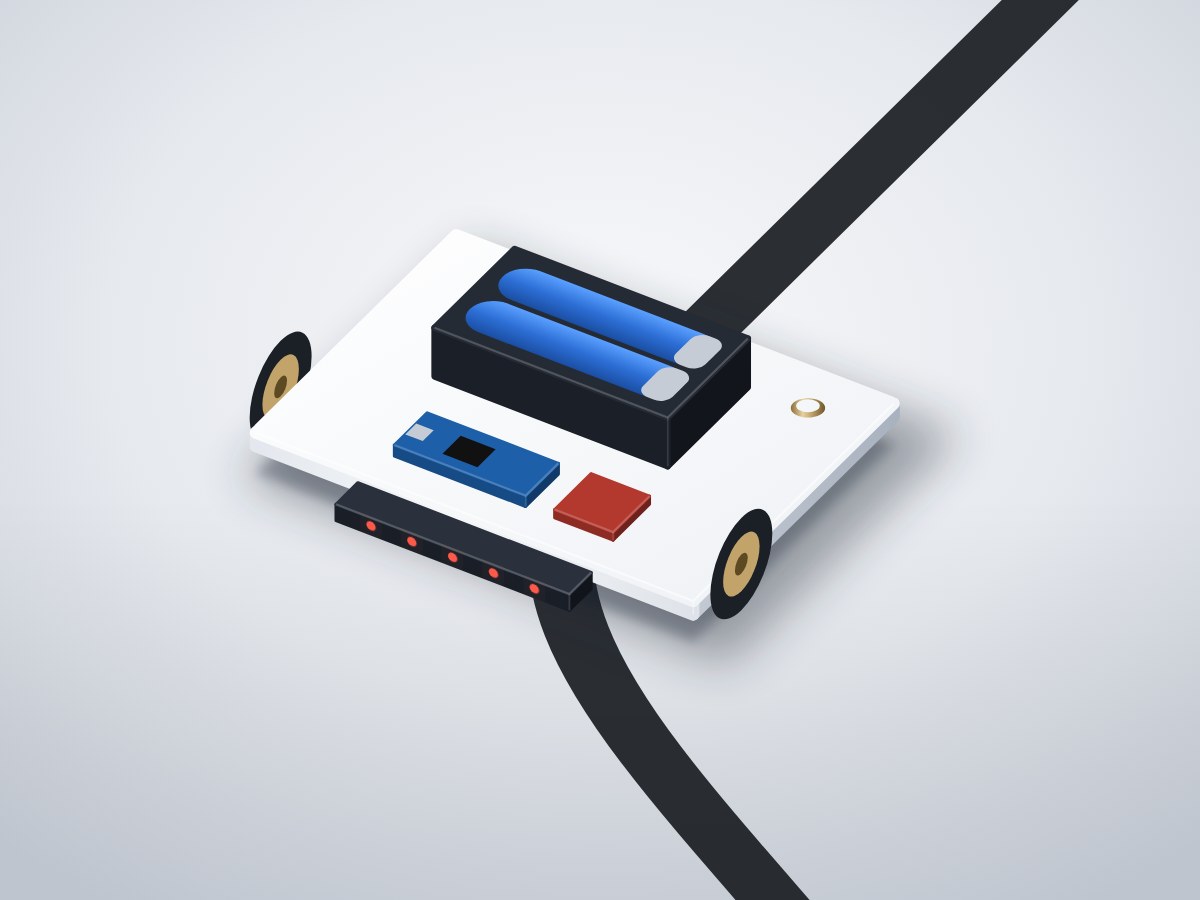
A fast two-wheel robot that follows a black line using five infrared sensors and a PID controller. A classic school and college competition build, designed to be tuned and raced.
- Board
- Arduino Nano
- Difficulty
- Intermediate
- Build time
- ~4 hours
- Parts cost
- ~₹4,470
Line-following robot car
Electrical7₹3,256
Microcontroller1₹1,936
Power1₹220
Actuator3₹774
Sensor2₹326
Mechanical9₹1,214
3D printed3₹290
Hardware6₹924
How it works
Line followers teach sensing, motor control and feedback in one build, and they're the first event at most robotics competitions.
Five infrared reflectance sensors under the front bumper see the line. The Arduino Nano turns their readings into a position from −2 to +2 and runs a PID loop that speeds one wheel up and slows the other to stay centred. A TB6612FNG driver powers the two N20 gear motors from two 18650 cells; it runs far cooler than the old L298N.
Press the start button, place the car on the line and it runs. Tune KP and KD at the top of the sketch for your track.
Typical online prices in USD; they vary by supplier and quantity. Shop links search for the exact part number.
Drag to pan, scroll to zoom, hover a wire to trace it.
Pin map
| From | To | Wire | Purpose |
|---|---|---|---|
| + 2 × 18650 battery holder with switch | VIN Arduino Nano | Red | 7.4 V to Nano |
| - 2 × 18650 battery holder with switch | GND Arduino Nano | Black | Common ground |
| + 2 × 18650 battery holder with switch | VM Dual motor driver | Red | Motor power |
| 5V Arduino Nano | VCC Dual motor driver | Red | Logic power |
| GND Arduino Nano | GND Dual motor driver | Black | Ground |
| D7 Arduino Nano | AIN1 Dual motor driver | Yellow | Signal |
| D8 Arduino Nano | AIN2 Dual motor driver | Yellow | Signal |
| D5 Arduino Nano | PWMA Dual motor driver | Orange | Left speed |
| D4 Arduino Nano | BIN1 Dual motor driver | Green | Signal |
| D12 Arduino Nano | BIN2 Dual motor driver | Green | Signal |
| D6 Arduino Nano | PWMB Dual motor driver | Orange | Right speed |
| D11 Arduino Nano | STBY Dual motor driver | White | Enable |
| AO1 Dual motor driver | M+ Left N20 gear motor | Red | Power |
| AO2 Dual motor driver | M- Left N20 gear motor | Black | Ground |
| BO1 Dual motor driver | M+ Right N20 gear motor | Red | Power |
| BO2 Dual motor driver | M- Right N20 gear motor | Black | Ground |
| 5V Arduino Nano | VCC 5-channel infrared line sensor | Red | Power |
| GND Arduino Nano | GND 5-channel infrared line sensor | Black | Ground |
| OUT1 5-channel infrared line sensor | A0 Arduino Nano | Blue | Signal |
| OUT2 5-channel infrared line sensor | A1 Arduino Nano | Blue | Signal |
| OUT3 5-channel infrared line sensor | A2 Arduino Nano | Blue | Centre sensor |
| OUT4 5-channel infrared line sensor | A3 Arduino Nano | Blue | Signal |
| OUT5 5-channel infrared line sensor | A6 Arduino Nano | Blue | Signal |
| D2 Arduino Nano | SIG Start button | Purple | Start |
| GND Arduino Nano | GND Start button | Black | Ground |
Tools & assumptions
Tools
- Soldering iron and solder
- Wire stripper
- Small screwdrivers
- Multimeter
- Black electrical tape for a test track
Assumptions
- Arduino IDE 2
- An 18650 charger
Prepare
0/2- 1.1
Print the chassis
Dual motor driverTB6612FNG moduleLeft N20 gear motorN20 6V 600 RPMRight N20 gear motorN20 6V 600 RPMChassis plate with bumperMechanicalN20 motor bracketsMechanical - 1.2
Mount the mechanics
Small screwdriversDual motor driverTB6612FNG moduleLeft N20 gear motorN20 6V 600 RPMRight N20 gear motorN20 6V 600 RPMN20 motor bracketsMechanical34 mm rubber wheelsMechanicalSteel ball caster, 12 mmMechanical
Wire
0/3- 2.1
Wire the power
Main controllerArduino Nano2 × 18650 battery holder with switch2S 18650 holder with toggle switchDual motor driverTB6612FNG module - 2.2
Wire the motor driver
Dual motor driverTB6612FNG moduleLeft N20 gear motorN20 6V 600 RPMRight N20 gear motorN20 6V 600 RPMN20 motor bracketsMechanical - 2.3
Wire the sensors and button
Left N20 gear motorN20 6V 600 RPMRight N20 gear motorN20 6V 600 RPMStart buttonTactile switch 12 × 12 mm
Program
0/1- 3.1
Flash and calibrate
5-channel infrared line sensorTCRT5000 5-channel arrayStart buttonTactile switch 12 × 12 mm
Test
0/2- 4.1
Check direction
Dual motor driverTB6612FNG moduleLeft N20 gear motorN20 6V 600 RPMRight N20 gear motorN20 6V 600 RPMStart buttonTactile switch 12 × 12 mmN20 motor bracketsMechanical34 mm rubber wheelsMechanical - 4.2
Tune and race
Black electrical tape for a test track
// PID line follower: Arduino Nano + TB6612FNG + 5-channel IR array
const int AIN1 = 7, AIN2 = 8, PWMA = 5, BIN1 = 4, BIN2 = 12, PWMB = 6, STBY = 11, BTN = 2;
const int SENSORS[5] = {A0, A1, A2, A3, A6};

float KP = 22, KD = 140;
int BASE_SPEED = 150;
int lo[5], hi[5];
float lastError = 0;
bool running = false;

void motor(int in1, int in2, int pwm, int speed) {
  digitalWrite(in1, speed >= 0); digitalWrite(in2, speed < 0);
  analogWrite(pwm, constrain(abs(speed), 0, 255));
}

float position() {                       // -2 (far left) .. +2 (far right)
  long sum = 0, weighted = 0;
  for (int i = 0; i < 5; i++) {
    int v = map(analogRead(SENSORS[i]), lo[i], hi[i], 0, 1000);
    v = constrain(v, 0, 1000);
    sum += v; weighted += (long)v * (i - 2) * 1000;
  }
  if (sum < 300) return lastError > 0 ? 2 : -2;   // line lost: keep turning the way we were
  return weighted / (float)sum / 1000.0;
}

void calibrate() {
  for (int i = 0; i < 5; i++) { lo[i] = 1023; hi[i] = 0; }
  unsigned long t = millis();
  while (millis() - t < 3000)
    for (int i = 0; i < 5; i++) { int v = analogRead(SENSORS[i]); lo[i] = min(lo[i], v); hi[i] = max(hi[i], v); }
}

void setup() {
  for (int p : {AIN1, AIN2, PWMA, BIN1, BIN2, PWMB, STBY}) pinMode(p, OUTPUT);
  pinMode(BTN, INPUT_PULLUP);
  digitalWrite(STBY, HIGH);
  if (digitalRead(BTN) == LOW) calibrate();
  else for (int i = 0; i < 5; i++) { lo[i] = 100; hi[i] = 900; }
}

void loop() {
  if (digitalRead(BTN) == LOW) { running = !running; delay(400); }
  if (!running) { motor(AIN1, AIN2, PWMA, 0); motor(BIN1, BIN2, PWMB, 0); return; }
  float error = position();
  float correction = KP * error + KD * (error - lastError);
  lastError = error;
  motor(AIN1, AIN2, PWMA, BASE_SPEED + correction);
  motor(BIN1, BIN2, PWMB, BASE_SPEED - correction);
}
After flashing, open the serial monitor to see live readings from your board.
- Every wire lands on a real pin25 connections checked against the Arduino Nano pinout.
- Pins match what each part needsPWM, analog, I²C and input-only rules all hold.
- No pin is double-bookedEach signal pin drives one part; shared buses are wired correctly.
- Supply voltages matchEvery part is on a rail it is rated for.
- Signal levels are compatibleAll parts work with 5 V logic.
- Everything shares a common groundAll parts with a GND pin are connected.
- Current draw is within limits~62 mA from the board, 16% of what the Arduino Nano can supply.
- Everything fits in the enclosure3 parts placed inside a 150 × 110 × 30 mm case with no overlaps.
Before you buy parts in bulk or sell what you build, have a qualified engineer review the design.
Discussion
No comments yet. Ask a question, share your build, or suggest an improvement.
Sign in to join the discussion.