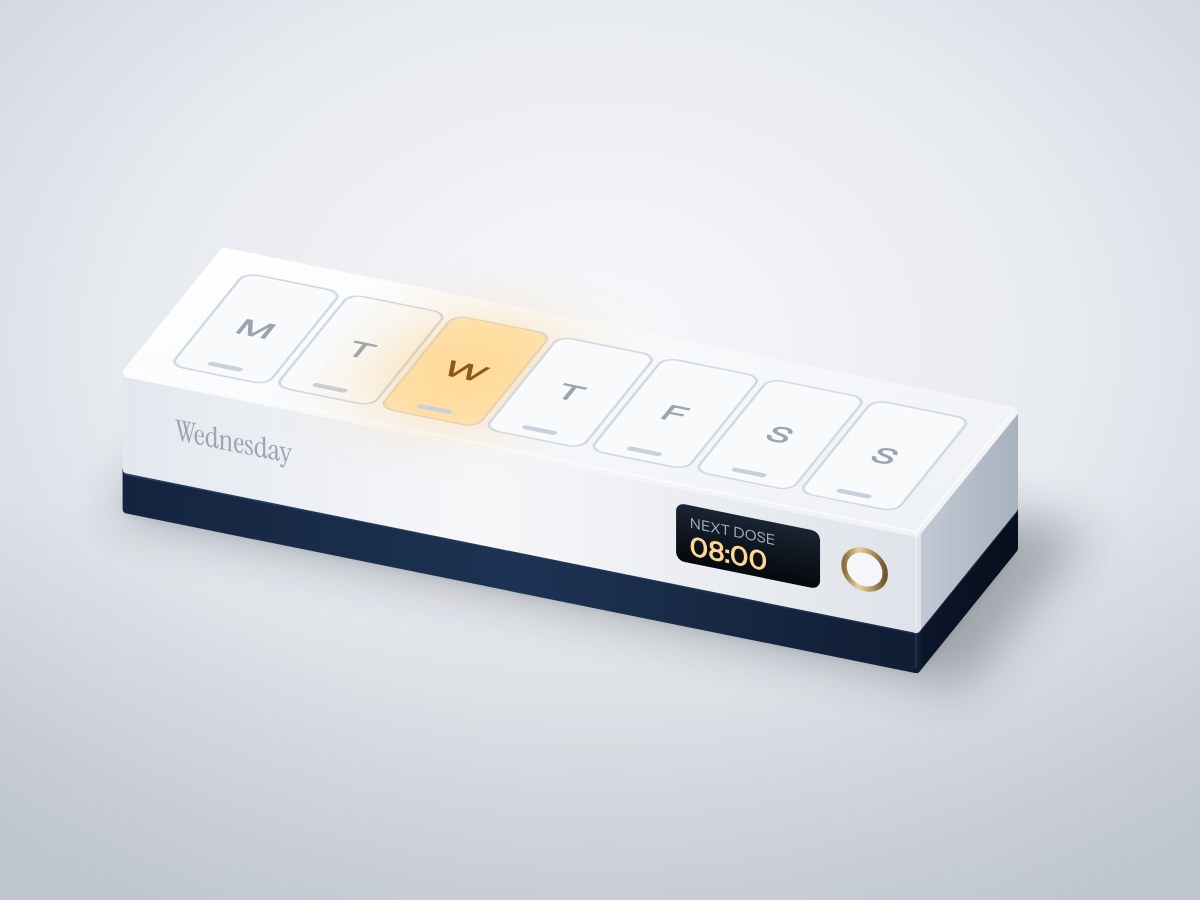
A seven-day pill organiser that lights up today's compartment at dose time, beeps until the lid is opened, and shows the next dose on a small screen. Family members can check on Wi-Fi whether today's dose was taken.
- Board
- ESP32 DevKit V1
- Difficulty
- Beginner
- Build time
- ~3 hours
- Parts cost
- ~₹2,178
Medicine reminder box
Electrical8₹1,619
Microcontroller1₹704
Power1₹106
Module1₹176
Actuator2₹229
Sensor2₹53
Display1₹352
Mechanical13₹559
3D printed2₹484
Hardware11₹75
How it works
Older parents often live alone and miss or double their medicines. A plain pill box can't tell anyone what happened; this one can.
At each dose time the LED under today's compartment lights and a gentle buzzer sounds. Opening the lid (sensed by a magnet and reed switch) or pressing the button marks the dose as taken and silences the alarm. A battery-backed clock keeps time through power cuts, so doses are never missed after an outage.
The screen shows the time and the next dose. On the home Wi-Fi, anyone in the family can open the box's page to see today's doses and when each was taken.
Typical online prices in USD; they vary by supplier and quantity. Shop links search for the exact part number.
Drag to pan, scroll to zoom, hover a wire to trace it.
Pin map
| From | To | Wire | Purpose |
|---|---|---|---|
| VBUS USB-C 5 V input module | VIN ESP32 DevKit V1 | Red | 5 V to board |
| GND USB-C 5 V input module | GND ESP32 DevKit V1 | Black | Common ground |
| 3V3 ESP32 DevKit V1 | VCC Real-time clock | Red | Power |
| GND ESP32 DevKit V1 | GND Real-time clock | Black | Ground |
| GPIO21 ESP32 DevKit V1 | SDA Real-time clock | Blue | Clock data |
| GPIO22 ESP32 DevKit V1 | SCL Real-time clock | Green | Signal |
| 3V3 ESP32 DevKit V1 | VCC 0.96" OLED display | Red | Power |
| GND ESP32 DevKit V1 | GND 0.96" OLED display | Black | Ground |
| GPIO21 ESP32 DevKit V1 | SDA 0.96" OLED display | Blue | Signal |
| GPIO22 ESP32 DevKit V1 | SCL 0.96" OLED display | Green | Signal |
| VBUS USB-C 5 V input module | VCC Compartment LED strip | Red | 5 V to LEDs |
| GND ESP32 DevKit V1 | GND Compartment LED strip | Black | Ground |
| GPIO4 ESP32 DevKit V1 | DIN Compartment LED strip | Purple | LED data |
| GPIO27 ESP32 DevKit V1 | SIG Lid reed switch | Yellow | Lid |
| GND ESP32 DevKit V1 | GND Lid reed switch | Black | Ground |
| 3V3 ESP32 DevKit V1 | VCC Active buzzer module | Red | Power |
| GND ESP32 DevKit V1 | GND Active buzzer module | Black | Ground |
| GPIO26 ESP32 DevKit V1 | IO Active buzzer module | Orange | Reminder |
| GPIO14 ESP32 DevKit V1 | SIG Taken button | White | Taken |
| GND ESP32 DevKit V1 | GND Taken button | Black | Ground |
Tools & assumptions
Tools
- Soldering iron and solder
- Wire stripper
- Small Phillips screwdriver
- Super glue
- 3D printer or a printing service
Assumptions
- Arduino IDE 2 with the ESP32 board package
- The dose times you want
Prepare
0/2- 1.1
Print the tray and base
3D printer or a printing serviceReal-time clockDS3231 module with CR20327-compartment tray with hinged lidMechanicalElectronics baseMechanical - 1.2
Fit the LED strip
Wire stripperCompartment LED stripWS2812B strip, 7 LEDs at 25 mm pitch7-compartment tray with hinged lidMechanicalElectronics baseMechanical
Wire
0/3- 2.1
Wire power
Wire stripperMain controllerESP32 DevKit V1USB-C 5 V input moduleUSB-C 5V breakout (16-pin)Compartment LED stripWS2812B strip, 7 LEDs at 25 mm pitch - 2.2
Wire the clock and screen
Real-time clockDS3231 module with CR20320.96" OLED displaySSD1306 0.96in I2C OLED - 2.3
Wire the inputs and buzzer
Wire stripperCompartment LED stripWS2812B strip, 7 LEDs at 25 mm pitchLid reed switchMKA-14103 glass reed switchActive buzzer moduleKY-012 active buzzer (transistor-driven)Taken buttonTactile switch 12 × 12 mm
Program
0/1- 3.1
Set dose times and flash
Real-time clockDS3231 module with CR2032
Test
0/1- 4.1
Test a reminder
Active buzzer moduleKY-012 active buzzer (transistor-driven)
Assemble
0/1- 5.1
Glue the magnet and close
Small Phillips screwdriverSuper glueCompartment LED stripWS2812B strip, 7 LEDs at 25 mm pitchLid reed switchMKA-14103 glass reed switch7-compartment tray with hinged lidMechanicalElectronics baseMechanicalNeodymium magnet, 6 × 3 mmMechanical
Install first: RTClib, Adafruit NeoPixel, Adafruit SSD1306, Adafruit GFX Library
#include <WiFi.h>
#include <WebServer.h>
#include <Wire.h>
#include <RTClib.h>
#include <Adafruit_NeoPixel.h>
#include <Adafruit_SSD1306.h>
const char* WIFI_NAME = "your-wifi";
const char* WIFI_PASS = "your-password";
const long UTC_OFFSET = 19800; // India, UTC+5:30
struct Dose { int h, m; };
const Dose DOSES[] = {{8, 0}, {14, 0}, {21, 0}};
const int N = sizeof(DOSES) / sizeof(DOSES[0]);
const int LED_PIN = 4, REED_PIN = 27, BTN_PIN = 14, BUZZER_PIN = 26;
RTC_DS3231 rtc;
Adafruit_NeoPixel leds(7, LED_PIN, NEO_GRB + NEO_KHZ800);
Adafruit_SSD1306 oled(128, 64, &Wire, -1);
WebServer server(80);
int pending = -1; // index of the dose waiting to be taken
String takenAt[4];
int compartment(DateTime t) { return (t.dayOfTheWeek() + 6) % 7; } // Monday = 0
void draw(DateTime t) {
oled.clearDisplay(); oled.setTextColor(SSD1306_WHITE);
oled.setTextSize(2); oled.setCursor(0, 0); oled.printf("%02d:%02d", t.hour(), t.minute());
oled.setTextSize(1); oled.setCursor(0, 30);
if (pending >= 0) oled.print("Time for your medicine");
else for (int i = 0; i < N; i++) if (DOSES[i].h * 60 + DOSES[i].m > t.hour() * 60 + t.minute()) { oled.printf("Next dose %02d:%02d", DOSES[i].h, DOSES[i].m); break; }
oled.display();
}
void setup() {
pinMode(REED_PIN, INPUT_PULLUP); pinMode(BTN_PIN, INPUT_PULLUP); pinMode(BUZZER_PIN, OUTPUT);
Wire.begin(21, 22);
rtc.begin(); leds.begin(); leds.setBrightness(60);
oled.begin(SSD1306_SWITCHCAPVCC, 0x3C);
WiFi.begin(WIFI_NAME, WIFI_PASS);
for (int i = 0; i < 40 && WiFi.status() != WL_CONNECTED; i++) delay(250);
if (WiFi.status() == WL_CONNECTED) { // set the RTC from the internet
configTime(UTC_OFFSET, 0, "pool.ntp.org");
struct tm now; if (getLocalTime(&now)) rtc.adjust(DateTime(now.tm_year + 1900, now.tm_mon + 1, now.tm_mday, now.tm_hour, now.tm_min, now.tm_sec));
}
server.on("/", [] {
String s = "<meta name=viewport content='width=device-width'><h2>Today's medicine</h2>";
for (int i = 0; i < N; i++) s += "<p>" + String(DOSES[i].h) + ":" + (DOSES[i].m < 10 ? "0" : "") + String(DOSES[i].m) + " — " + (takenAt[i].length() ? "taken at " + takenAt[i] : "not yet") + "</p>";
server.send(200, "text/html", s);
});
server.begin();
}
void loop() {
server.handleClient();
DateTime t = rtc.now();
if (t.hour() == 0 && t.minute() == 0) for (auto& s : takenAt) s = "";
for (int i = 0; i < N; i++)
if (t.hour() == DOSES[i].h && t.minute() == DOSES[i].m && takenAt[i] == "") pending = i;
bool opened = digitalRead(REED_PIN) == HIGH, pressed = digitalRead(BTN_PIN) == LOW;
if (pending >= 0 && (opened || pressed)) { takenAt[pending] = String(t.hour()) + ":" + String(t.minute()); pending = -1; }
leds.clear();
if (pending >= 0) leds.setPixelColor(compartment(t), leds.Color(255, 170, 40));
leds.show();
digitalWrite(BUZZER_PIN, pending >= 0 && (millis() / 700) % 3 == 0);
draw(t);
delay(200);
}
After flashing, open the serial monitor to see live readings from your board.
- Every wire lands on a real pin20 connections checked against the ESP32 DevKit V1 pinout.
- Pins match what each part needsPWM, analog, I²C and input-only rules all hold.
- No pin is double-bookedEach signal pin drives one part; shared buses are wired correctly.
- Supply voltages matchEvery part is on a rail it is rated for.
- Signal levels are compatibleAll parts work with 3.3 V logic.
- Everything shares a common groundAll parts with a GND pin are connected.
- Current draw is within limits~46 mA from the board, 9% of what the ESP32 DevKit V1 can supply.
- Everything fits in the enclosure5 parts placed inside a 150 × 50 × 25 mm case with no overlaps.
Before you buy parts in bulk or sell what you build, have a qualified engineer review the design.
Discussion
No comments yet. Ask a question, share your build, or suggest an improvement.
Sign in to join the discussion.