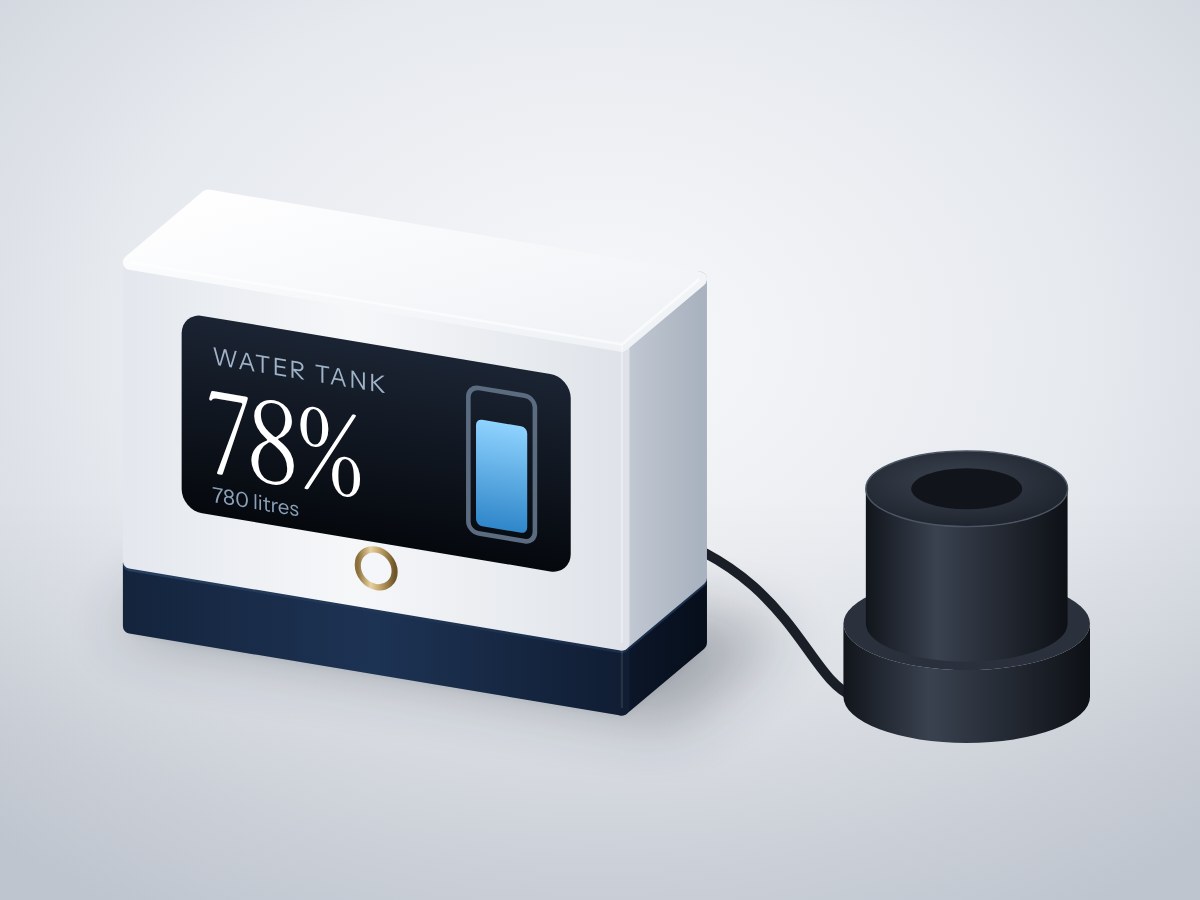
Know how full your overhead tank is without climbing the stairs. A waterproof ultrasonic sensor in the tank lid measures the water level, a display in the house shows it as a percentage, and a buzzer warns before the tank runs dry or overflows.
- Board
- ESP32 DevKit V1
- Difficulty
- Beginner
- Build time
- ~2 hours
- Parts cost
- ~₹3,036
Water tank level monitor
Electrical6₹2,394
Microcontroller1₹704
Power1₹106
Sensor2₹1,162
Display1₹352
Actuator1₹70
Mechanical15₹642
3D printed2₹264
Hardware13₹378
How it works
In many homes the only way to check the overhead tank is to climb up and look, or wait until the taps run dry. This monitor fixes that for about the price of a tank float valve.
A sealed ultrasonic sensor sits in the tank lid and measures the distance down to the water. The ESP32 turns that into litres and a percentage using the tank's height, shows it on an OLED in the house and serves it on your Wi-Fi so you can check from your phone.
A buzzer sounds when the level drops below 15% or rises above 95% (useful while the pump is filling). A button silences it. It only reads and warns; it never switches the pump motor, so no mains wiring is involved.
Typical online prices in USD; they vary by supplier and quantity. Shop links search for the exact part number.
Drag to pan, scroll to zoom, hover a wire to trace it.
Pin map
| From | To | Wire | Purpose |
|---|---|---|---|
| VBUS USB-C 5 V input module | VIN ESP32 DevKit V1 | Red | 5 V to board |
| GND USB-C 5 V input module | GND ESP32 DevKit V1 | Black | Common ground |
| 3V3 ESP32 DevKit V1 | VCC Waterproof ultrasonic sensor | Red | 3.3 V to tank |
| GND ESP32 DevKit V1 | GND Waterproof ultrasonic sensor | Black | Ground |
| TX Waterproof ultrasonic sensor | GPIO16 ESP32 DevKit V1 | Yellow | Distance data |
| RX Waterproof ultrasonic sensor | GPIO17 ESP32 DevKit V1 | White | Signal |
| 3V3 ESP32 DevKit V1 | VCC 0.96" OLED display | Red | Power |
| GND ESP32 DevKit V1 | GND 0.96" OLED display | Black | Ground |
| GPIO21 ESP32 DevKit V1 | SDA 0.96" OLED display | Blue | Signal |
| GPIO22 ESP32 DevKit V1 | SCL 0.96" OLED display | Green | Signal |
| 3V3 ESP32 DevKit V1 | VCC Active buzzer module | Red | Power |
| GND ESP32 DevKit V1 | GND Active buzzer module | Black | Ground |
| GPIO26 ESP32 DevKit V1 | IO Active buzzer module | Orange | Alarm |
| GPIO27 ESP32 DevKit V1 | SIG Silence button | Purple | Silence |
| GND ESP32 DevKit V1 | GND Silence button | Black | Ground |
Tools & assumptions
Tools
- Soldering iron and solder
- Wire stripper
- Drill with a 40 mm hole saw
- Screwdriver
Assumptions
- Arduino IDE 2 with the ESP32 board package
- Your tank's inside height in centimetres
Prepare
0/2- 1.1
Measure the tank
Tank lid sensor mountMechanical - 1.2
Fit the sensor in the lid
Drill with a 40 mm hole sawScrewdriverDisplay case and wall-mount backMechanicalTank lid sensor mountMechanical
Wire
0/2- 2.1
Run the cable
Soldering iron and solderTank lid sensor mountMechanical4-core shielded cableMechanicalPG7 cable glandsMechanical - 2.2
Wire the display unit
0.96" OLED displaySSD1306 0.96in I2C OLEDActive buzzer moduleKY-012 active buzzer (transistor-driven)Silence buttonTactile switch 12 × 12 mm
Program
0/1- 3.1
Set your tank size
Tank lid sensor mountMechanical
Test
0/1- 4.1
Check the reading
Tank lid sensor mountMechanical
Assemble
0/1- 5.1
Mount the display
ScrewdriverDisplay case and wall-mount backMechanicalTank lid sensor mountMechanicalM2.5 screws and wall plugsMechanical
Install first: Adafruit SSD1306, Adafruit GFX Library
#include <WiFi.h>
#include <WebServer.h>
#include <Wire.h>
#include <Adafruit_SSD1306.h>

const char* WIFI_NAME = "your-wifi";
const char* WIFI_PASS = "your-password";

// ---- Your tank ----
const float EMPTY_CM = 120;   // lid to tank floor
const float FULL_CM  = 15;    // lid to overflow level
const int   LITRES   = 1000;
const int   LOW_PCT = 15, HIGH_PCT = 95;

const int BUZZER_PIN = 26, BTN_PIN = 27;
HardwareSerial sonar(2);
Adafruit_SSD1306 oled(128, 64, &Wire, -1);
WebServer server(80);
int percent = -1; bool muted = false; int lastAlarmState = 0;

float readDistanceCm() {                       // A02YYUW frame: 0xFF H L SUM
  while (sonar.available() >= 4) {
    if (sonar.read() != 0xFF) continue;
    uint8_t h = sonar.read(), l = sonar.read(), sum = sonar.read();
    if (((0xFF + h + l) & 0xFF) == sum) return (h * 256 + l) / 10.0;
  }
  return -1;
}

void draw() {
  oled.clearDisplay(); oled.setTextColor(SSD1306_WHITE);
  oled.setTextSize(1); oled.setCursor(0, 0); oled.print("Water tank");
  oled.setTextSize(3); oled.setCursor(0, 14); oled.print(percent); oled.print("%");
  oled.drawRect(100, 10, 24, 50, SSD1306_WHITE);
  int h = 48 * percent / 100; oled.fillRect(102, 59 - h, 20, h, SSD1306_WHITE);
  oled.setTextSize(1); oled.setCursor(0, 50); oled.printf("%d litres", LITRES * percent / 100);
  oled.display();
}

void setup() {
  pinMode(BUZZER_PIN, OUTPUT); pinMode(BTN_PIN, INPUT_PULLUP);
  sonar.begin(9600, SERIAL_8N1, 16, 17);
  Wire.begin(21, 22);
  oled.begin(SSD1306_SWITCHCAPVCC, 0x3C);
  WiFi.begin(WIFI_NAME, WIFI_PASS);
  server.on("/", [] { server.send(200, "text/plain", String(percent) + "% (" + String(LITRES * percent / 100) + " L)"); });
  server.begin();
}

void loop() {
  server.handleClient();
  float d = readDistanceCm();
  if (d > 0) {
    percent = constrain((int)((EMPTY_CM - d) * 100 / (EMPTY_CM - FULL_CM)), 0, 100);
    draw();
  }
  int alarm = percent >= 0 && percent < LOW_PCT ? 1 : percent > HIGH_PCT ? 2 : 0;
  if (alarm != lastAlarmState) { muted = false; lastAlarmState = alarm; }
  if (digitalRead(BTN_PIN) == LOW) muted = true;
  digitalWrite(BUZZER_PIN, alarm && !muted && (millis() / 500) % 2);
  delay(100);
}
After flashing, open the serial monitor to see live readings from your board.
- Every wire lands on a real pin15 connections checked against the ESP32 DevKit V1 pinout.
- Pins match what each part needsPWM, analog, I²C and input-only rules all hold.
- No pin is double-bookedEach signal pin drives one part; shared buses are wired correctly.
- Supply voltages matchEvery part is on a rail it is rated for.
- Signal levels are compatibleAll parts work with 3.3 V logic.
- Everything shares a common groundAll parts with a GND pin are connected.
- Current draw is within limits~53 mA from the board, 11% of what the ESP32 DevKit V1 can supply.
- Everything fits in the enclosure4 parts placed inside a 90 × 60 × 35 mm case with no overlaps.
Before you buy parts in bulk or sell what you build, have a qualified engineer review the design.
Discussion
No comments yet. Ask a question, share your build, or suggest an improvement.
Sign in to join the discussion.